 HIRO Developer Portal
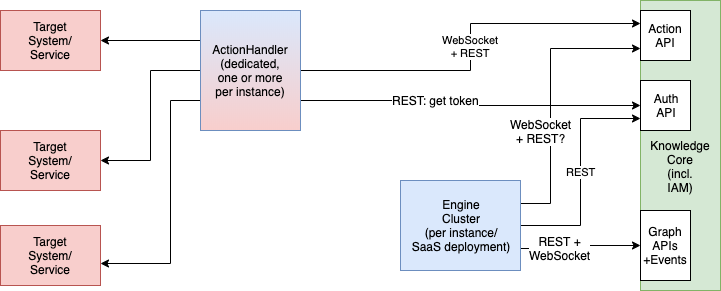
Table of Contents
The Action API has been introduced to separate the deployment of action handlers from the HIRO™ Engine. The new Action API uses the graph as a "broker" between the Engine and action handlers and all the connections are now outbound (from customer network perspective) to the HIRO SaaS system. This enables customers to deploy Action Handlers on premises and make an outbound connection to the Action API without opening an inbound port.
Also, the action data is persisted in the SaaS infrastructure, so crashes or interruptions of network connectivity should not result in failed or repeated execution of the same command.
System Architecture
Figure 1. Action API System Architecture
Terminology
Action Handler
An Action Handler is a separate component that has the capability to perform actions on the customer’s target systems. Depending on the requirements and the type of Action Handler, it can now be either deployed on the HIRO™ SaaS platform itself or on the premises of the customer.
Capability
A capability describes a specific type of action (e.g. "ExecuteCommand") and the mandatory and optional parameters (e.g. "Command", "Timeout" or "Host"). Capabilities are meant to be defined globally and should be considered as kind of a "feature contract" between Knowledge Item writers and Action Handler implementations. The semantics of a capability and its parameters should be the same across all installations so that KIs making use of Action Handlers will continue to work even though underlying implementations of the handlers might be completely different.
Applicability
An applicability binds a global capability to a specific Action Handler instance running alongside a single engine. It can optionally supply additional parameters to the actual handler implementation not part of the capability definition but these will not be visible or directly accessible to KI writers. The applicability can limit the scope on which vertices this specific handler-binding will be available.
For example an applicability could specify that an SSH based Action Handler provides the capability ExecuteCommand but only on linux machines (represented in the environment model as vertices of the type ogit/MARS/Machine with a machineClass attribute "Linux") which have a "SSHKeyID" attribute as well. The SSHKeyID would then be added to the parameter set sent to the action handler implicitly without KI writers needing to care about that.
ActionHandler Implementation Requirements
Support for transparent encryption and decryption of sensitive Information
Starting with version 2.3.0 the reference implementation of the HIRO ActionHandler will support asymmetric cryptography for secure transportation of sensitive information through the platform. Authors of external ActionHandlers are strongly encouraged to add support for this functionality as well.
In order to support arbitrary lengths of data, S/MIME has been selected as the data format.
Encrypting capabilities should support the parameter "EncryptionKey" that specifies the logical name of the public key to be used for encryption (translates to a locally stored filename atm, will be moved to Graph Key API when released).
The command used to encrypt data in the reference implementation (it is advisable to store VALUE as explicit environment variable before to avoid escaping problems, CERT_FILE should point to the S/MIME Certificate file specified by the EncryptionKey parameter):
printf -- "$VALUE" | openssl smime -encrypt -aes256 -outform DER $CERT_FILE | base64 -w0ALL actionhandlers should automatically detect encrypted values contained within their input parameters and try to decrypt these if the corresponding private key is available. The format of the encrypted data in the input parameters is
{{HIROCRYPT/$KEYNAME:$PAYLOAD}}The command used to decrypt the PAYLOAD data in the reference implementation with KEYFILE name derived from KEYNAME:
echo "$PAYLOAD" | base64 -d | openssl smime -decrypt -inform DER -inkey $KEYFILEInterface / API Definitions
(GET) / capabilities
The Action Handler application can request the list of registered capabilities with their parameter list from the global registry.
Response Example
{
  "ExecuteCommand": {
    "description": "this one executes commands",
    "mandatoryParameters": {
      "command": {
        "description": "command to execute"
        },
    "host": {
      "description": "hostname to execute command on"
      }
    },
    "optionalParameters": {
      "timeout": {
        "description": "timeout in seconds",
        "default": "120"
        }
    }
  }
}
(GET) / applicabilities
Application can request the list of registered applicabilities with their parameter list.
{
  "HandlerID1": {
    "ExecuteCommand": {
      "on ogit/machineClass == \"linux\" ssh_keyfile ssh_options": {
        "ssh_keyfile": "${ssh_keyfile}",
        "ssh_options": "${ssh_options}"
        },
      "on ogit/machineClass == \"linux\" ssh_keyfile not ssh_options": {
        "ssh_keyfile": "${ssh_keyfile}",
        "ssh_options": "some default options here"
        }
      },
    "ParameterlessExecute": [
      "on ogit/machineClass == \"windows\""
      ]
  }
}
WebSocket Protocol
The websocket is a full duplex TCP connection which allows for the bi-directional communication between the Graph and the Action Handler. Below is the sequence of actions that take place from the engine → graph → the action handler.
URL: wss://core.almato.ai/api/action-ws/1.0/
SubProtocol: action-1.0.0
Sample websocket connection request:
var ws = new WebSocket('wss://core.almato.ai/api/action-ws/1.0/', ['action-1.0.0', 'token-' + '$token'])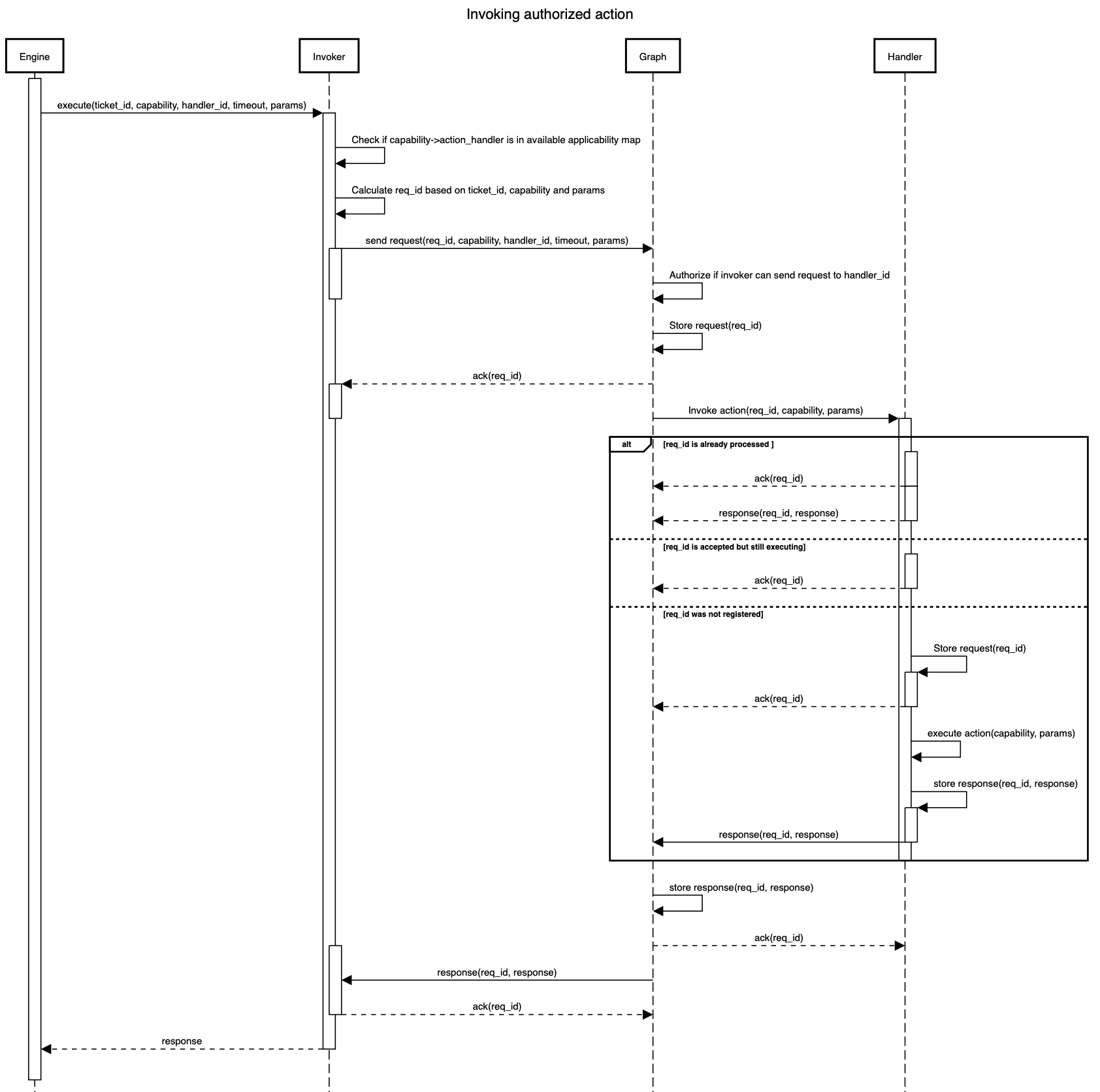
Figure 2. Invocation Sequence
Payload of messages that go from engine via action api to action handler and back are json encoded strings. All messages must have type argument plus additional arguments specific to that message type.
On top of that, all messages except hello also contain id argument. That one represents request id and is used for idempotency. Due to the distributed nature of the system, action api
implements sending "at least once" strategy, meaning that it might send the same message multiple times but action handler should check if that message id has already been processed or not and act accordingly.
Message types that are in use are:
-
hello
-
submitAction
-
sendActionResult
-
acknowledged
-
negativeAcknowledged
hello
Once connection is successfully established, action handler will receive hello message from action api:
[WsConnection] Received hello message: %{\"client_id\" => \"cloei2yl2h1h4018358ez5g33_cm4ckvw679n5v0193cxogsqwj\", \"host\" => \"hiro-graph-actionapi-774f985cc7-f48bl\", \"server_version\" => \"0.1.0\", \"type\" => \"hello\"}","metadata":{}}
The structure of hello message is:
{
  "type": "hello",
  "host": "action api node that accepted connection",
  "server_version": "application version of the action api node",
  "client_id": "id of the client in the graph"
}
Arguments in this message are of informational nature only.
heartbeat
Action API will send ws ping (not binary) message to connected clients and expects pong message back. If pong message is missing after 3 pings, action api will disconnect the client assuming that connection is hanging. Thus, clients should be ready to handle dropped connections and to reconnect.
The same is advised for the clients. They should also send ws ping messages to the action api and reconnect if pong is missing couple of times repeatedly.
submitAction
On the successful execution of a KI which requires an action handler, the engine sends a submitAction message to the graph who in turn invokes the action handler and sends the message to it.
Engine → Graph → Action Handler
The sample structure of the message sent by the graph to the action handler is as follows:
{
  "type": "submitAction",
  "id": "the $requestId in App->Graph, the $appId:$requestId in Graph->AH",
  "handler": "handlerId",
  "capability": "capabilityName",
  "timeout": 300000,
  "parameters": {
    "parametername1": "parametervalue1",
    "parametername2": "parametervalue2"
  }
}
All fields are mandatory but content of the "parameters" map is specific to the handler
and may contain anything. timeout field is in milliseconds and handler field is not sent to the action handler.
Action API will send the same request each couple of seconds even if action handler acknowledged that request. In such situation, action handler should not execute action again but it still has to acknowledge message.
This behaviour is useful if during action execution action handler is restarted. If it doesn’t have a way to persist ongoing executions, it can rely that action api will resend request that it didn’t receive response for.
sendActionResult
Once the action handler is done executing the action it sends back a response to the graph which in turn is sent to the engine by the graph for further processing.
Action Handler → Graph → Engine
The sample structure of the message sent by the action handler to the graph is as follows:
{
  "type": "sendActionResult",
  "id": "the $appId:$requestId in AH->Graph, the $requestId in Graph->App",
  "result": {
    "resultfield1": "resultvalue1",
    "resultfield2": "resultvalue2"
  }
}
Again, the content of the result is specific to the handler and may have any content mapped to it.
It is highly recommended though that result includes action_status which is non-negative number and action_error as nil or string describing why action execution didn’t succeed.
If action was executed and is returning result of the execution, action_status should be 0. This status shouldn’t be confused with execution status/code though.
It is ok to have http request that returns 500 status code for example, but action_status should still be 0 because response is the result of execution … whatever it is.
The same situation is for execution of the scripts or commands on a remote machine. action_status is not representation of exit code!
action_status can be used in the KI for debugging or adding some additional logic for the execution or retry.
Action handler should keep sending response to the action api until it gets acknowledged message back.
action_status codes in use
0: "action executed"
11: "Action API didn’t ack request" 12: "Action API didn’t respond" 13: "ActionHandler didn’t respond. Last status in Action API was #{inspect(last_status)}" 14: "ActionHandler responded with execution timeout"
51: "AH configuration problem (proxy misconfigured?)" 52: "Request doesn’t match AH config (wrong cert requested?)" 53: "Error preparing request in AH (ah can’t build request with provided args)" 54: "Execution failed/crashed or there was an error with processing response"
666: "Unexpected error"
ack
This is the acknowledgement sent to confirm to the sender that the message has been received in any of the following cases:
-
Sent back from graph once request has been persisted
-
Sent back from handler once request has been received
-
Sent back from graph once result has been persisted
-
Sent back from engine once result has been received
The structure of an ack message is:
{
  "type": "acknowledged",
  "id": "the $appId:$requestId in AH->Graph, the $requestId in Graph->App"
}
nack
This is the message sent to confirm to the sender that the message has not been received in any of the following cases:
-
Sent back from graph when request could not be persisted
-
Sent back from handler when request can not be handled
-
Sent back from graph when result could not be persisted
-
Sent back from engine when result can not be processed
The structure of an nack message is:
{
  "type": "negativeAcknowledged",
  "id": "the $appId:$requestId in AH->Graph, the $requestId in Graph->App",
  "code": " the error_code ",
  "message": "error description why request was nack'ed"
}
code 404 should be returned from the action handler if it doesn’t support requested capability